Pulsera NFC de TPU / NFC Wristband
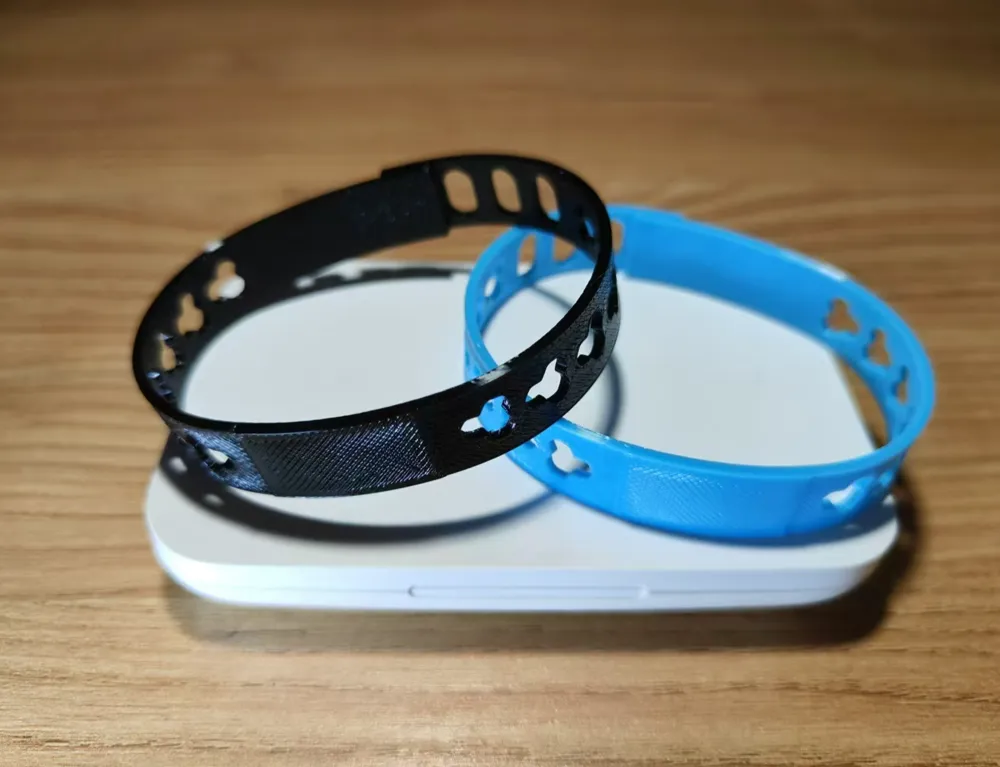
tagNFCwristbandpulsera
Descripción
Comentarios y actividad
Deja una nota para la comunidad o sigue la actividad de esta pieza.
Inicia sesión para dejar un comentario.
Aún no hay actividad.
Deja una nota para la comunidad o sigue la actividad de esta pieza.
Inicia sesión para dejar un comentario.
Aún no hay actividad.
🌎 English
📿 NFC Identification Wristband
This is an NFC wristband used to help identify people in relief and emergency situations. Each wristband carries a small NFC chip that, once programmed, opens a web link with a simple tap of a phone. That link can point to a person's identification page on PrintForHelp, so rescuers, medical teams, and volunteers can quickly recognize who a person is and find the information linked to them.
Unlike the printable parts on PrintForHelp, this is not a 3D print: it is a physical wristband you buy, and then program yourself with the link we provide. No app is needed to read it: modern phones open the link automatically when you tap the wristband.
⚠️ Important: the NFC chip must come BLANK
The wristband must have an empty (blank, unprogrammed) NFC chip. If the chip comes pre-recorded or locked from the factory, it cannot be used, because we will not be able to write the identification link onto it. Before buying, confirm the listing says the tag is blank, writable, and not locked.
🛒 Which model to buy
Please use only this NFC wristband model, since it is confirmed to work:
You can buy it from any of these links:
🔧 How to program it
💜 Credits
These wristbands are shared with the PrintForHelp community to help identify and protect people during relief efforts. Every wristband counts.
Thank you for helping. We are counting on your solidarity! 💚
🌎 Español
📿 Manilla NFC de identificación
Esta es una manilla NFC que se usa para ayudar a identificar personas en situaciones de ayuda y emergencia. Cada manilla lleva un pequeño chip NFC que, una vez programado, abre un enlace web con solo acercar un teléfono. Ese enlace puede dirigir a la página de identificación de una persona en PrintForHelp, para que rescatistas, equipos médicos y voluntarios reconozcan rápidamente quién es la persona y encuentren la información asociada a ella.
A diferencia de las piezas imprimibles de PrintForHelp, esto no es una impresión 3D: es una manilla física que compras y luego programas tú mismo con el enlace que te damos. No hace falta ninguna app para leerla: los teléfonos modernos abren el enlace automáticamente al acercarlos a la manilla.
⚠️ Importante: el chip NFC debe venir EN BLANCO
La manilla debe tener el chip NFC vacío (en blanco, sin programar). Si el chip viene pregrabado o bloqueado de fábrica, no se podrá usar, porque no podremos escribir el enlace de identificación en él. Antes de comprar, confirma que la descripción diga que la etiqueta está en blanco, es grabable y no está bloqueada.
🛒 Qué modelo comprar
Por favor usa únicamente este modelo de manilla NFC, ya que está confirmado que funciona:
Puedes comprarla desde cualquiera de estos enlaces:
🔧 Cómo programarla
💜 Créditos
Estas manillas se comparten con la comunidad de PrintForHelp para ayudar a identificar y proteger a las personas durante las labores de ayuda. Cada manilla cuenta.
Gracias por ayudar. ¡Contamos con tu solidaridad! 💚